Configure Afina profiles for Singapore mobile connections
How to configure Afina profiles with Singapore mobile IP addresses
An Afina profile with a Singapore mobile IP means an isolated browser profile whose traffic exits through a mobile carrier connection in Singapore. Teams use this setup to inspect local pages, verify advertising, and operate legitimate regional accounts without mixing cookies or browser storage. The main risks are inconsistent location signals, careless IP rotation, weak proxy credentials, and behavior that breaks a platform’s rules.
The connection has two distinct parts. Singapore Mobile Proxy supplies the network route through a dedicated modem and SIM. Afina’s proxy manager stores that route inside a specific browser profile and keeps the profile’s cookies, cache, localStorage, and IndexedDB separate from other profiles. Afina’s claim here is practical: one profile can keep its own browser state, fingerprint settings, and assigned proxy in a single local workspace.
This isn’t a guarantee against account reviews or restrictions. Afina doesn’t control the reputation of an IP, the history of an account, or the rules used by TikTok, Meta, Shopee, and other platforms. A technically consistent profile can still fail if an operator changes location too often, repeats identical actions across accounts, or violates a platform policy.
What to collect before opening Afina
Start with the connection details from Singapore Mobile Proxy. You need the host, port, username, password, protocol, and the URL used to request a new IP. Afina supports HTTP, HTTPS, and SOCKS5 proxies. If you are not sure which one your port should use, our HTTP and SOCKS5 port setup guide covers the difference. It supports IPv4, but it doesn’t support IPv6 proxies, so confirm the address format before spending time on profile settings.
The provider advertises dedicated 4G and 5G connections on real carrier SIM cards, on demand rotation, and plans starting with 200 GB. Its published test illustrates why a speed check matters. One 4G modem result shows 6.08 Mbps download, 12.02 Mbps upload, and 34 ms ping, while a 5G device result shows 344.8 Mbps download, 42.6 Mbps upload, and 12 ms latency. Those figures are examples from the provider’s infrastructure, not a speed promise for every session. Carrier load, modem type, and location can change the result sharply.
For a first test, use one profile, one dedicated connection, and one low risk task. But don’t import twenty profiles before confirming that the visible IP, country, login, and target site all behave as expected. A small test makes a wrong port or stale password obvious.
Add the mobile proxy to one profile
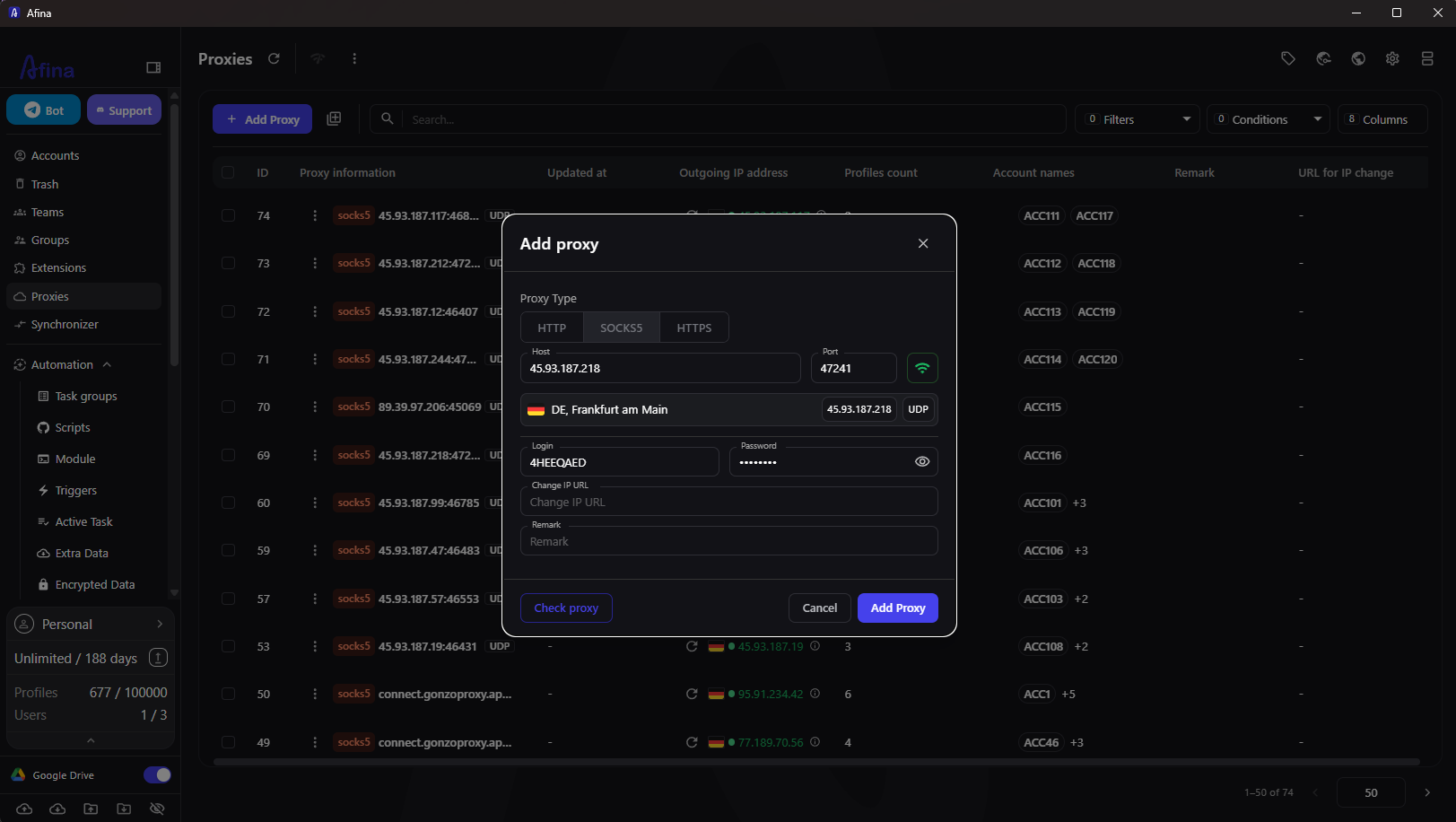
Create a new Afina profile or edit an existing one. Open the Proxy tab and choose Set proxy. Enter the supplied values exactly. A single transposed digit in the port is enough to make the connection fail.
-
Choose HTTP, HTTPS, or SOCKS5 according to the credentials
-
Paste the host and port
-
Enter the username and password if authentication is required
-
Paste the rotation endpoint into Change IP URL
-
Add a useful remark such as SG mobile content check
-
Run the proxy check before saving
Afina performs a network test and reports the visible IP, country, and connection availability. For SOCKS5, it can also test UDP support. A dead proxy isn’t saved through the normal interface. If the checker times out while the proxy works elsewhere, Afina lets you switch the checking service between ip api and ipinfo in its additional settings.
The screenshot below shows the exact account level fields. The example uses a different country because it comes from a reusable Afina interface set, but the position of the controls is the same.
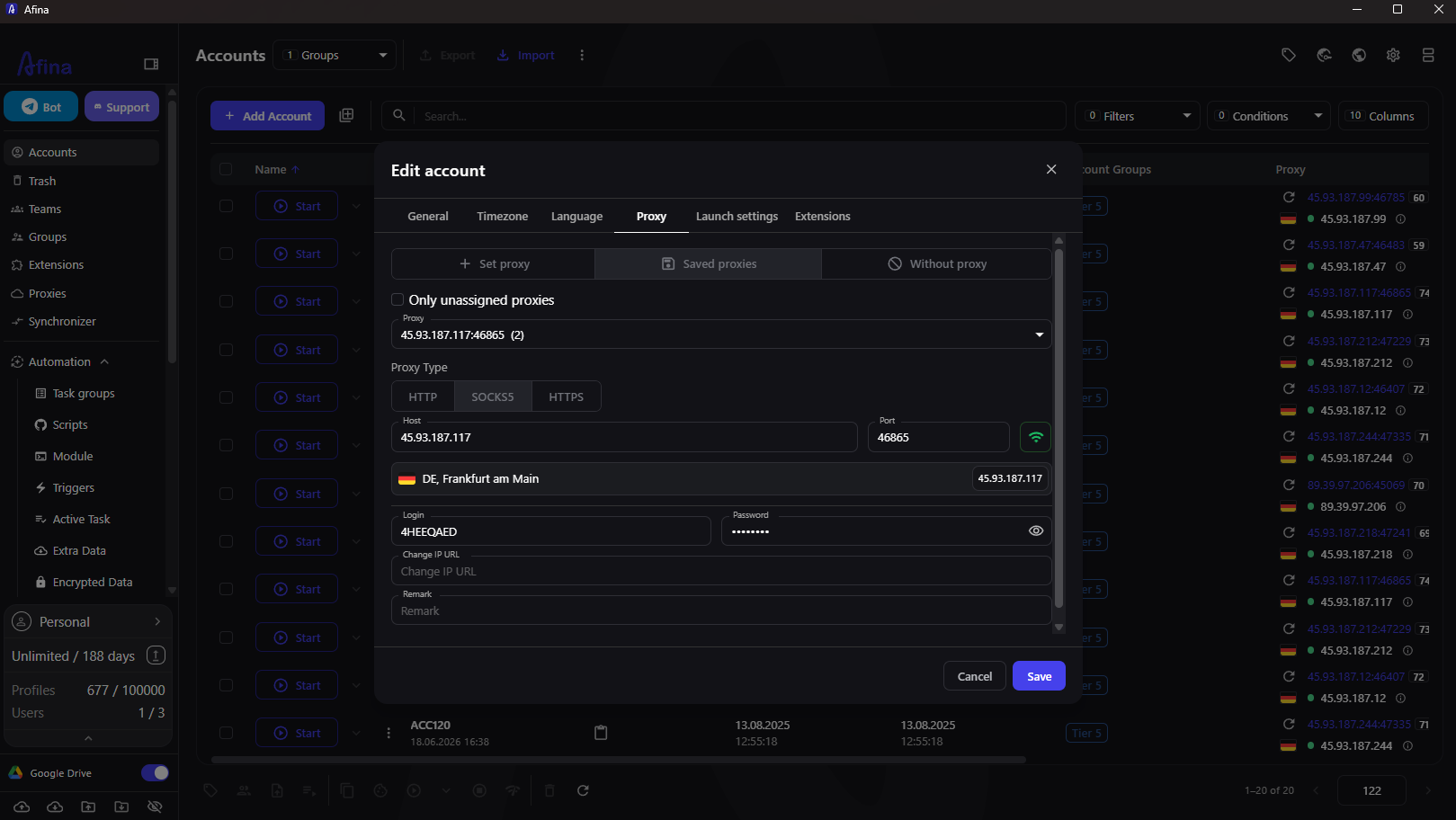
After saving, launch the profile and visit a reputable IP test page. Confirm that the visible country is Singapore. If you selected SOCKS5 with UDP support, also compare the remote WebRTC address with the public address reported by the test. The local address should remain hidden. Don’t install a VPN extension inside the profile. Such an extension can override the assigned proxy and expose a different route.
Align profile signals with the IP
A Singapore exit address paired with an unrelated timezone and language is a needless inconsistency. In the same profile, enable Timezone from IP and Languages from IP. Afina can then derive these settings from the proxy location rather than relying on a workstation configured for another region.
Fingerprint settings deserve restraint. Afina exposes User Agent, Canvas, WebGL, Audio, Rects, CPU, memory, and screen data. Changing every field and adding noise everywhere doesn’t make a profile safer. Afina’s own guidance recommends keeping most parameters real and changing only what the task requires. A normal configuration is usually less suspicious than a collection of extreme values.
Keep one operational identity tied to one profile. That means its cookies, account history, proxy assignment, and normal working hours stay together. If three employees open the same account from unrelated routes during the same hour, isolation inside the browser can’t repair the behavioral contradiction.
Decide how and when to rotate
Rotation policy is its own decision, and we cover the tradeoff in sticky vs rotating sessions. Mobile rotation is useful when a route becomes unavailable or when a research task explicitly requires a fresh network address. It shouldn’t become a reflex after every page. A sudden IP change during an authenticated session can trigger a challenge, especially when the new address belongs to a different carrier range.
Afina stores the Change IP URL, but it doesn’t include a built in scheduler that calls the rotation endpoint at fixed intervals. Rotation must be requested by the operator or arranged through an external call or an Afina RPA workflow. This is an important compromise. The setup gives you control, but it asks you to define a sensible rotation policy.
Use this sequence for an authenticated profile. Close sensitive tabs, request the new IP, wait for the provider to complete the change, run the Afina proxy check, confirm the country, and only then continue. If the provider rotates within Singapore, the country remains stable, but the platform may still notice the address change. Afina can block access when the proxy country changes. It doesn’t provide a general kill switch for every same country IP change.
Scale from one profile to a working set
Once one profile passes the checks, save the proxy and assign it from the Saved proxies view. The Only unassigned proxies option helps prevent accidental reuse of one connection across several active identities. For a larger set, Afina also supports bulk proxy assignment.
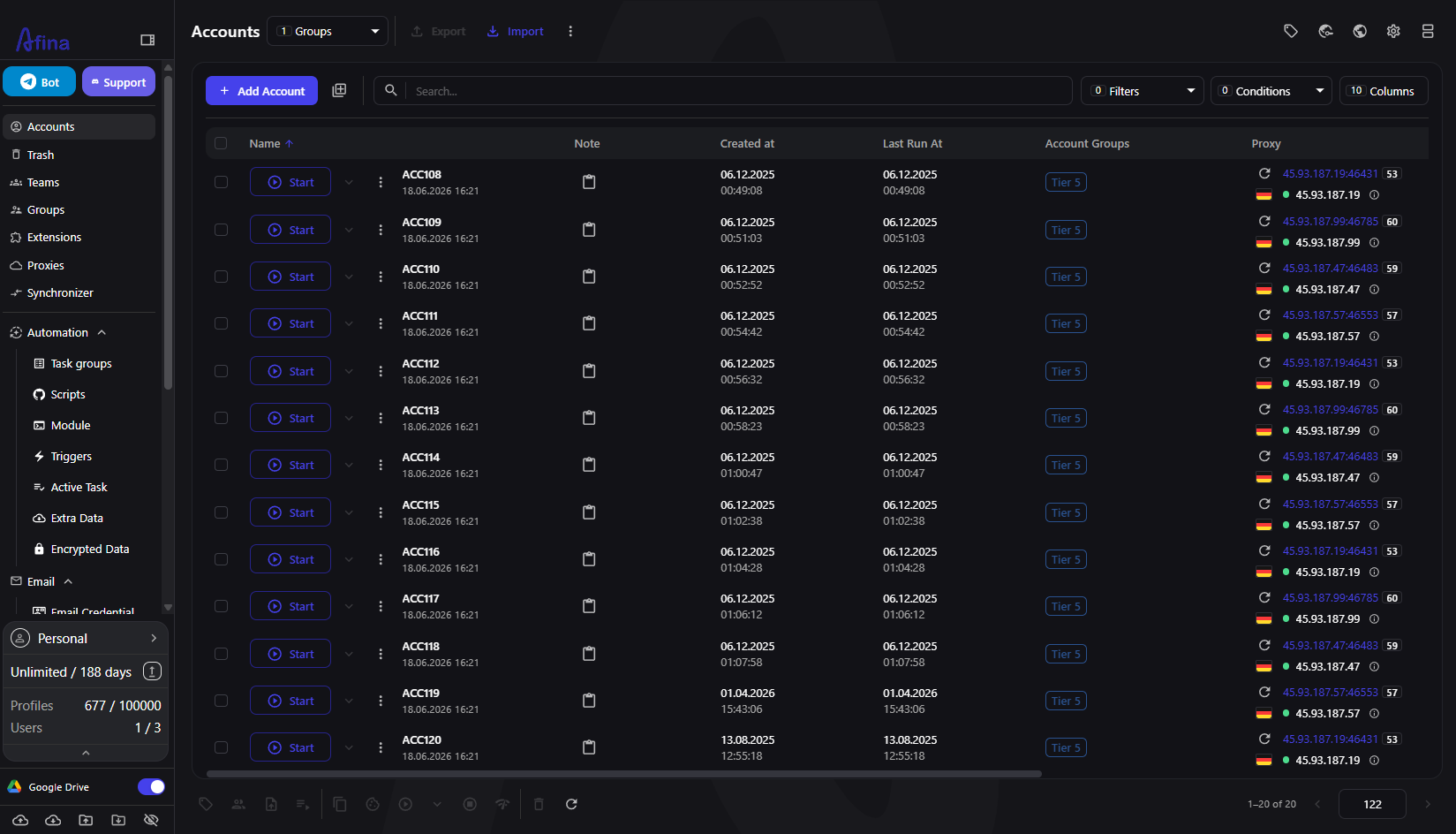
The account list gives an operator a quick view of profile names, groups, last run times, and assigned proxies. Use clear names that connect each profile to a client, task, or account owner without exposing passwords in the label.
Dedicated doesn’t mean unlimited. The provider’s 200 GB plan can be consumed quickly by video review, large uploads, or repeated page capture. Ten profiles streaming 500 MB each use about 5 GB. Forty such sessions use about 20 GB. Track traffic before a content team turns a month of capacity into a one week allowance.
The workstation also becomes a constraint. Afina runs each active profile as a separate Chromium process and documented usage is roughly 300 to 500 MB of RAM per running profile. Ten ordinary profiles can therefore need about 3 to 5 GB before heavy sites and extensions add their share. Start profiles in batches instead of opening every account at once.
Run a repeatable acceptance test
Treat setup as complete only after a short acceptance test. Record the expected carrier, country, public IP, profile name, and test time. Then open the target service and perform a normal read only action.
-
Confirm that Afina marks the proxy active
-
Confirm the visible country and IP in the profile
-
Check WebRTC when UDP is part of the SOCKS5 service
-
Verify that timezone and language follow the intended location
-
Close and reopen the profile to confirm that cookies persist
-
Request one planned rotation and repeat the network checks
A failed test should stop the rollout. Common real failures include a VPN extension taking over the route, an IPv6 credential that Afina can’t accept, a rotation request made while an account session is open, and one proxy assigned to several profiles by mistake. Fix the cause before creating more profiles.
Afina isolates browser data, but it can’t make poor infrastructure trustworthy. Singapore Mobile Proxy also notes that speed varies with carrier and network load. Keep that variability in the operating plan, especially for time sensitive ad checks or uploads.
Promo code SALE20 gives new users 20% off all plans except Max.
Promo code SALE30 gives new users 30% off the Max plan.
FAQ
Should every Afina profile have its own mobile proxy?
For separate operational identities, one dedicated route per active profile is the clearest arrangement. Reusing one IP can link activity at the network level even when browser storage is isolated.
Does Afina rotate a mobile IP automatically?
Afina stores a Change IP URL, but scheduled rotation isn’t built in. An operator, external call, or RPA workflow must trigger it.
Can this setup prevent every account restriction?
No. It improves separation and network consistency, but platform rules, account history, operator behavior, and proxy quality still determine the outcome.